


Citizen Developer: Meaning, Benefits, Skills, and Best Practices
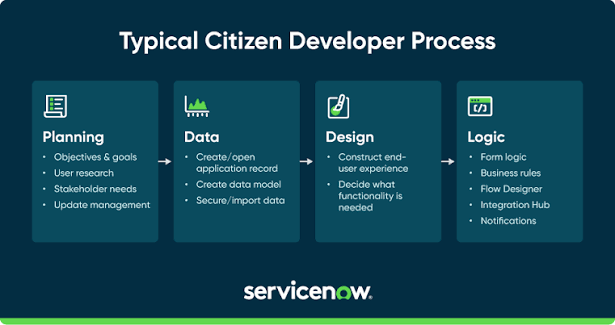
A citizen developer is a person who creates digital applications, automated workflows, or business tools without working as a professional software developer. Citizen developers usually use low-code or no-code platforms to build solutions that address everyday business challenges.
These individuals often work in departments such as marketing, finance, human resources, sales, customer service, and business operations. Because they understand their daily tasks, they can identify problems and create practical technology solutions that improve productivity.
For example, a human resources employee might create an employee onboarding application, while a marketing professional could develop a tool to organize campaign information. Instead of waiting for a traditional development team to build every small solution, these employees can use accessible development tools to address straightforward needs.
Citizen development is becoming an important part of digital transformation because organizations need flexible software solutions that help employees work more efficiently. It also encourages collaboration between business teams and IT professionals.
How Does Citizen Development Work?
Citizen development works by giving employees access to approved development platforms that simplify application creation. These platforms provide visual interfaces, templates, prebuilt components, and automation features that reduce the need for traditional programming.
The process generally begins when an employee identifies a problem in an existing business process. The employee then determines what the application should accomplish and selects an appropriate development tool.
For example, a sales team might struggle to track customer inquiries through spreadsheets and email messages. A citizen developer could create a centralized tracking application with customer records, status updates, and automated notifications.
After building the solution, the developer tests its functionality and gathers feedback from colleagues. The application can then be improved and deployed according to the organization's approval procedures.
IT professionals may help with security, integrations, data access, and technical standards. Their involvement ensures that citizen development supports business objectives without creating unnecessary technology risks.
The Role of Low-Code and No-Code Platforms
Low-code and no-code platforms make citizen development accessible to people who have limited programming experience. Although both approaches simplify software creation, they offer different levels of technical flexibility.
Low-Code Development
Low-code platforms allow users to build applications through visual development tools while providing opportunities to add custom code when necessary. They are useful for applications that require more advanced workflows, integrations, or business logic.
Citizen developers can use low-code platforms to create internal dashboards, approval systems, inventory applications, and reporting tools. Professional developers can also extend these solutions when more sophisticated functionality is required.
No-Code Development
No-code platforms allow users to create applications without writing traditional programming code. They often include drag-and-drop interfaces, ready-made templates, visual workflow builders, and configurable components.
These tools are suitable for simple applications, digital forms, task management systems, and basic business automation. They can help employees develop useful solutions without needing extensive technical knowledge.
AI-Powered Development Tools
Artificial intelligence is making citizen development more accessible by helping users describe application requirements in everyday language. Depending on the platform, AI tools can suggest workflows, generate application components, explain errors, and assist with data analysis.
However, AI-generated solutions still require careful testing and review. Users must verify that applications handle information correctly, follow company policies, and perform as intended.
Key Benefits of Citizen Development
Citizen development provides several advantages for businesses that want to improve their processes and make better use of available resources.
Faster Application Development
Traditional software development can involve lengthy requirements discussions, technical planning, implementation, and testing. Citizen development can shorten this process for relatively simple applications.
Employees can create prototypes, test ideas, and make improvements without depending entirely on a centralized development team. This helps organizations respond more quickly to changing business requirements.
Improved Business Productivity
Manual processes often require employees to perform repetitive tasks, maintain spreadsheets, and exchange multiple emails. Citizen developers can automate many of these activities through digital workflows.
For example, an employee could create a system that automatically assigns incoming requests, sends reminders, and updates task statuses. This reduces repetitive work and gives employees more time for important responsibilities.
Reduced Development Costs
Citizen development can lower the cost of building certain internal applications by reducing the need for extensive custom programming. Organizations may also save time by allowing employees to address straightforward problems themselves.
However, savings depend on licensing, training, maintenance, security requirements, and the complexity of each solution. Citizen development should complement professional software development rather than replace it in every situation.
Better Understanding of Business Needs
Citizen developers usually understand the processes they want to improve because they work with those processes every day.
This knowledge helps them identify unnecessary steps, common mistakes, and missing features. As a result, applications can reflect actual employee needs instead of relying entirely on assumptions.
Greater Innovation
When employees have access to suitable development tools, they can experiment with new ideas and develop practical solutions for their teams.
This encourages a culture of innovation in which employees actively participate in improving business operations. Organizations can also discover useful ideas that might otherwise remain unnoticed.
Reduced Pressure on IT Teams
IT departments frequently manage software maintenance, infrastructure, cybersecurity, integrations, and complex development projects.
Citizen developers can handle suitable low-risk applications under established guidelines. This allows professional developers to focus on more demanding technical responsibilities while still providing oversight where necessary.
Common Examples of Citizen Development
Citizen development can support many departments and business activities. The most effective applications usually address specific, well-defined problems.
Human Resources Applications
Human resources teams can create onboarding checklists, employee feedback forms, leave request workflows, and training trackers.
These applications help organize employee information, simplify administrative processes, and improve communication between staff members and HR professionals.
Marketing and Sales Tools
Marketing teams can develop campaign trackers, lead management dashboards, content approval workflows, and reporting applications.
Sales teams can use custom tools to organize customer inquiries, monitor opportunities, and coordinate follow-up activities.
Finance and Accounting Workflows
Finance employees can create expense tracking applications, invoice approval systems, budget dashboards, and payment request workflows.
Because financial information is sensitive, these applications require appropriate permissions, accurate calculations, and review by qualified personnel.
Customer Service Solutions
Customer service departments can build complaint tracking systems, support request forms, internal knowledge tools, and automated notification workflows.
These solutions help employees organize customer inquiries and monitor unresolved issues.
Inventory and Operations Management
Operations teams can use citizen development to track supplies, manage equipment requests, record maintenance activities, and monitor routine inspections.
A carefully designed application can reduce paperwork and improve the visibility of operational information.
Essential Skills for a Citizen Developer
Citizen developers do not necessarily need formal computer science qualifications, but certain skills help them build more useful and reliable applications.
Problem-Solving Skills
The ability to recognize business problems and identify practical solutions is essential. Citizen developers should understand the underlying issue before choosing a development tool.
Understanding Business Processes
Knowledge of existing workflows helps developers identify inefficiencies and determine which activities could benefit from automation.
Basic Technical Knowledge
Familiarity with spreadsheets, databases, data fields, conditional logic, and workflow automation provides a useful foundation.
More advanced applications may require knowledge of APIs, integrations, access controls, and data structures.
Communication and Collaboration
Citizen developers often work with colleagues, managers, and IT professionals. Clear communication helps them gather requirements, explain application behavior, and incorporate feedback.
Testing and Attention to Detail
Even simple applications can produce incorrect results if their workflows are poorly configured. Citizen developers should test different scenarios, check calculations, validate data, and correct errors before deployment.
Security Awareness
Understanding data privacy, permissions, and secure information handling is essential. Citizen developers must follow organizational policies and seek appropriate guidance when working with sensitive information.
Citizen Developer vs. Professional Developer
Citizen developers and professional developers both create software solutions, but their responsibilities and technical expertise often differ.
A citizen developer typically focuses on improving a specific business process through accessible development platforms. A professional developer usually has deeper programming knowledge and can design, build, test, and maintain complex software systems.
Citizen developers are particularly useful for simple internal applications, departmental workflows, and routine automation. Professional developers are better suited to complex integrations, large-scale platforms, advanced security requirements, and mission-critical systems.
The two roles can work together effectively. Citizen developers contribute business knowledge and identify practical opportunities, while professional developers provide architectural guidance, technical expertise, and quality assurance.
This collaborative approach helps organizations balance flexibility with reliability.
Common Challenges of Citizen Development
Although citizen development offers important advantages, organizations must address its potential risks.
Security and Data Privacy
Applications that handle sensitive information can introduce security problems if permissions and data protection measures are configured incorrectly.
Organizations should provide approved platforms, clear security policies, appropriate access controls, and regular reviews.
Limited Technical Expertise
Citizen developers may not fully understand application architecture, complex integrations, or performance requirements. These limitations can affect reliability when a project becomes more complicated than expected.
Clear project boundaries and access to IT support help prevent these problems.
Application Maintenance
An application may become difficult to maintain if its creator leaves the organization or changes responsibilities.
Businesses should document important workflows, assign application owners, maintain access records, and establish procedures for updates and retirement.
Integration Problems
Some applications need to exchange information with existing business systems. Poorly configured integrations can create duplicate records, inconsistent data, or unexpected errors.
IT teams should review integrations that affect important systems or sensitive information.
Uncontrolled Technology Growth
When employees build applications independently without proper oversight, organizations may accumulate redundant tools and unsupported workflows. This situation can create unnecessary costs and operational risks.
A centralized inventory of approved applications helps businesses understand what exists, who owns it, and whether each solution remains necessary.
Best Practices for Successful Citizen Development
A successful citizen development program combines employee independence with appropriate organizational oversight.
-
Choose approved tools: Provide platforms that meet business, security, and compliance requirements.
-
Define clear boundaries: Identify which applications employees can build independently and which require professional review.
-
Provide practical training: Teach users how to design workflows, manage data, test applications, and follow security policies.
-
Start with simple projects: Begin with low-risk tasks that have clear objectives and measurable outcomes.
-
Involve IT professionals: Seek expert guidance for complex integrations, sensitive data, and business-critical applications.
-
Document applications: Record ownership, purpose, permissions, dependencies, and maintenance requirements.
-
Measure performance: Evaluate whether applications save time, reduce errors, improve user satisfaction, or simplify business processes.
-
Review applications regularly: Update, improve, or retire solutions when business requirements change.
These practices help organizations encourage innovation while maintaining control over their technology environment.
How to Become a Citizen Developer
Becoming a citizen developer begins with identifying a problem that can be solved through a simple digital tool.
Start by examining repetitive tasks in your workplace, such as collecting information, tracking requests, preparing reports, or managing approvals. Choose a problem that has a clear scope and does not require access to highly sensitive information.
Next, explore an approved low-code or no-code platform and learn its basic features. Build a small prototype using sample or authorized data, then test it with a few users.
Gather feedback and improve the application before considering wider deployment. If the solution involves confidential information, financial transactions, external integrations, or important business operations, involve the appropriate technical and compliance teams.
As your experience grows, learn more about data management, automation logic, accessibility, testing, and security. These skills can help you develop increasingly useful solutions while understanding when professional technical assistance is necessary.
Frequently Asked Questions About Citizen Developers
What does a citizen developer do?
A citizen developer creates applications, automated workflows, and digital tools to solve business problems without working as a professional software developer. They commonly use low-code or no-code platforms to improve productivity and streamline daily tasks.
Do citizen developers need coding skills?
Citizen developers can build many applications without traditional coding skills. However, basic technical knowledge, logical thinking, and an understanding of data can help them create more reliable solutions. Some advanced projects may require coding or professional assistance.
What is citizen development used for?
Citizen development is used to create internal business applications, automate repetitive tasks, manage approvals, track customer requests, organize information, and improve reporting. It is particularly useful for straightforward problems that can be addressed through approved development tools.
What tools do citizen developers use?
Citizen developers use low-code platforms, no-code application builders, workflow automation software, visual database tools, and AI-assisted development environments. The appropriate tool depends on the project's complexity, security requirements, and organizational policies.
Is citizen development suitable for small businesses?
Yes. Small businesses can use citizen development to create practical tools without investing in extensive custom software development for every internal need. However, they should still consider licensing costs, data protection, maintenance, and the complexity of each application.
What are the main risks of citizen development?
The main risks include security vulnerabilities, poor data management, unsupported applications, integration failures, and a lack of documentation. Clear governance, appropriate training, and IT oversight can help reduce these risks.
Can citizen developers replace professional developers?
No. Citizen developers can handle many straightforward applications and workflows, but professional developers remain important for complex software, advanced integrations, scalability, architecture, and security-sensitive systems. Both roles can complement each other.
How does artificial intelligence help citizen developers?
Artificial intelligence can help citizen developers generate application components, suggest workflow logic, explain technical problems, and automate selected development tasks. Its output should always be tested and reviewed before being used in important business processes.
What makes a successful citizen developer?
A successful citizen developer understands business needs, solves problems logically, communicates effectively, tests applications carefully, and follows security guidelines. Curiosity and a willingness to learn also help them improve their technical capabilities.
Conclusion
Citizen developer practices are changing how organizations approach application development and business process improvement. By using low-code and no-code platforms, employees can create practical digital solutions without needing to become professional programmers.
The approach offers several advantages, including faster development, improved productivity, reduced pressure on IT teams, and greater employee participation in innovation. It can also help businesses address everyday operational challenges with tools designed around their actual needs.
However, successful citizen development requires more than accessible software. Organizations must establish security standards, provide training, maintain documentation, and involve IT professionals when projects become complex or business-critical.
For individuals, citizen development offers an opportunity to build valuable technical skills while improving their existing work. For organizations, it provides a way to encourage innovation without abandoning responsible technology management.

 English
 French
 Deutsch
 Русский
 Greek
Greek